Audience engagement has changed dramatically over the last few years. Whether you're hosting a conference, teaching a class, leading a webinar, or presenting to hundreds of attendees, people no longer want to sit quietly and watch. They want to participate, interact, and ask questions live.
A live Q&A session bridges the gap between presenters and audiences by creating an open, interactive environment where everyone can contribute. Instead of waiting until the end of a presentation, attendees can submit live questions, vote for the most important topics, and receive answers in real time.
QuestionWall makes this process simple. As a modern q&a tool, it enables speakers, educators, businesses, and event organizers to create engaging conversations without requiring complicated software or expensive hardware. Whether you're looking for a live q&a platform free for small meetings or a scalable solution for large conferences, QuestionWall helps audiences connect with presenters instantly.
Unlike traditional question-and-answer sessions that rely on microphones or paper notes, a digital live question and answer platform gives every participant an equal opportunity to contribute. Even attendees who are shy or participating remotely can confidently ask questions live using any device.
Why Live Q&A Matters More Than Ever
Modern audiences expect interaction. People spend their days using social media, messaging apps, and collaborative platforms where communication happens instantly. When they attend an event, they expect the same level of participation.
A professional q&a website allows presenters to collect feedback, encourage discussion, and understand what audiences truly care about. Instead of guessing which topics deserve more attention, presenters can simply review incoming live questions and respond to those receiving the highest number of votes. This creates more valuable conversations while keeping sessions organized and efficient.
Interactive events also improve information retention. Research consistently shows that people remember content better when they actively participate rather than passively listen. For educators, trainers, and businesses, implementing a live question and answer experience can significantly increase engagement while making presentations more memorable.
What Makes QuestionWall Different?
QuestionWall is designed specifically for organizations that want to simplify audience interaction. Rather than overwhelming users with unnecessary features, it focuses on providing a clean, intuitive experience where participants can immediately join discussions and ask questions live.
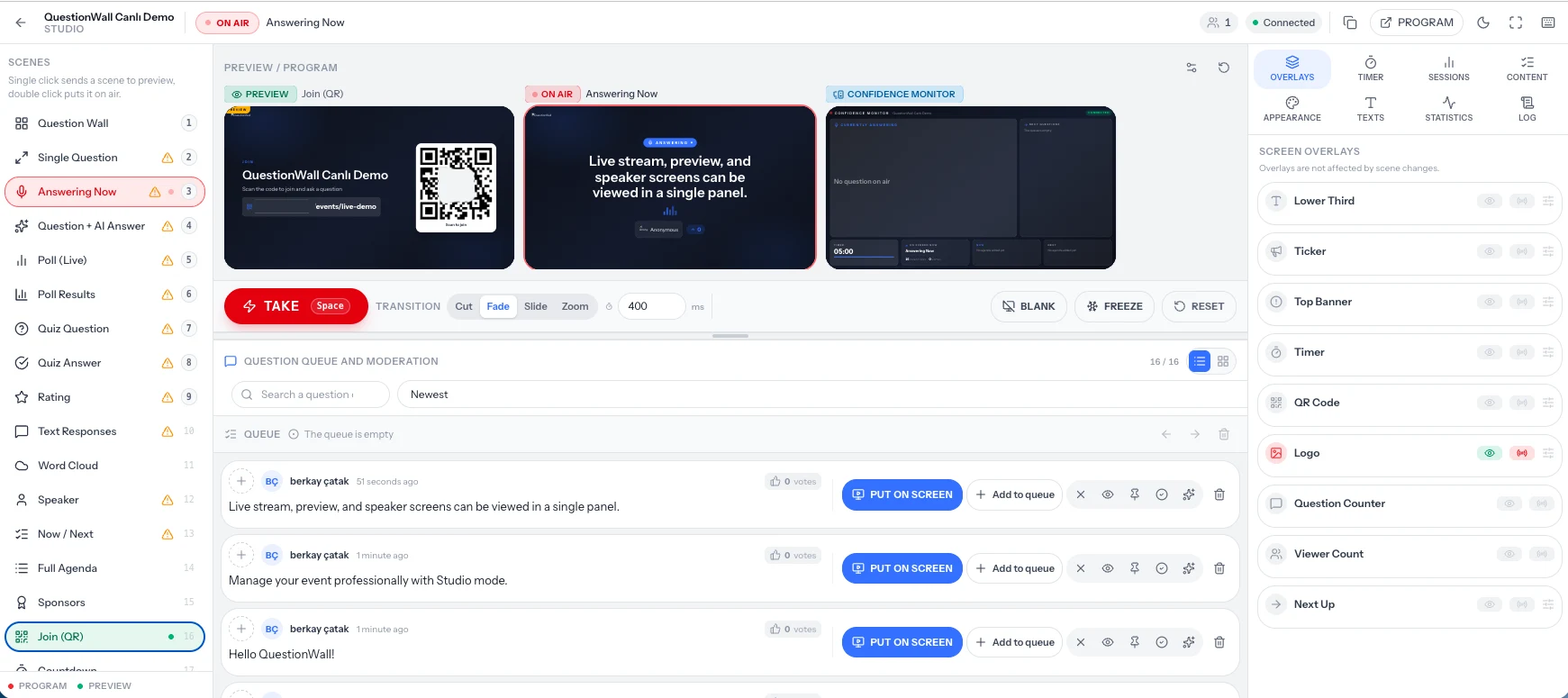
Creating a new session only takes a few moments. Participants simply scan a QR code or visit a shared link to start submitting live questions from their smartphones, tablets, or laptops. Because everything happens in real time, moderators can review incoming questions before publishing them, helping maintain professional discussions during conferences, educational events, business meetings, or public presentations.
This combination of simplicity and moderation makes QuestionWall suitable for virtually every type of event.
Key Features of a Modern Live Q&A Platform
An effective live q&a experience requires much more than a text box for submitting questions. QuestionWall combines multiple features into a single q&a tool that helps both presenters and attendees.
Real-Time Question Submission
Participants can submit live questions instantly without interrupting the speaker. Questions appear immediately for moderation or direct display, depending on the organizer's preferences.
Audience Voting
Not every audience member has the same question. Allowing attendees to vote helps presenters identify which topics deserve immediate attention. This improves the overall question answer live experience because speakers focus on the questions that matter most to the audience.
Anonymous Participation
Many attendees hesitate to speak publicly. Anonymous submissions encourage more honest discussions and increase participation during educational sessions, workshops, and corporate meetings. As a result, more people feel comfortable using the platform to ask questions live.
Easy Access from Any Device
One reason QuestionWall stands out as a modern live q&a app alternative is that participants do not need to install additional software. They simply open the shared link or scan a QR code to join the discussion from virtually any smartphone, tablet, or desktop browser. This accessibility removes barriers and encourages significantly higher participation rates.
Who Can Benefit from QuestionWall?
A flexible online live question answer platform can improve communication across many industries. Educational institutions use QuestionWall to increase classroom participation. Businesses collect employee feedback during company meetings. Conference organizers create engaging keynote sessions where attendees can submit live questions throughout presentations.
Training organizations use the platform to gather questions during workshops, while webinar hosts rely on it to create more dynamic online experiences. Even community organizations and nonprofit groups can benefit from using a reliable q&a website to encourage open communication during public discussions. Regardless of the audience size, a professional live q&a platform helps everyone stay connected throughout the event.
Why Traditional Q&A Sessions No Longer Work
For years, live events relied on handheld microphones and limited question-and-answer sessions at the end of presentations. While this approach worked for smaller audiences, it often excluded many participants. Only a few people had the opportunity to speak, and valuable questions were frequently left unanswered due to time constraints.
A digital live q&a platform solves these challenges by allowing everyone to participate simultaneously. Instead of waiting for a microphone, attendees can submit live questions the moment they think of them. This keeps discussions relevant and ensures important topics are not forgotten before the presentation ends.
QuestionWall also helps moderators organize incoming questions efficiently. Duplicate questions can be identified quickly, while the most popular submissions naturally rise to the top through audience voting. This creates a more structured question answer live experience that benefits both speakers and participants. Because the entire process happens online, QuestionWall also supports hybrid and remote events, making it an ideal online live question answer solution for modern organizations.
Live Q&A for Conferences and Events
Large conferences often bring together hundreds or even thousands of attendees. Managing audience interaction at this scale can be difficult without the right technology. QuestionWall makes conference engagement simple by providing a centralized q&a website where participants can submit live questions throughout the event. Instead of interrupting speakers, attendees can continue listening while adding questions whenever inspiration strikes.
Moderators can review incoming questions in real time and choose the most relevant ones for the presenter. Audience voting further improves the process by highlighting topics that resonate with the largest number of attendees. This creates a more engaging live question and answer session while ensuring discussions remain focused and valuable. Conference organizers also benefit from increased audience participation. Rather than hearing from only a handful of attendees, they receive insights from a much larger percentage of the audience.
Live Q&A for Education
Teachers and educators constantly look for ways to increase classroom participation. Unfortunately, many students hesitate to raise their hands even when they have important questions. Some worry about asking the wrong thing, while others simply prefer participating digitally. QuestionWall provides an inclusive live q&a environment where every student has the opportunity to contribute.
Students can ask questions live during lectures using their phones, tablets, or laptops. Instructors can answer questions immediately or save them for discussion later in the lesson. Anonymous participation encourages even shy students to become involved, resulting in more meaningful classroom discussions. Educational institutions can also use QuestionWall as a reliable q&a tool for online courses, hybrid learning environments, workshops, seminars, and training programs. The result is a more interactive learning experience where communication flows naturally between instructors and students.
Live Q&A for Businesses
Internal communication is essential for successful organizations. Whether hosting company-wide meetings, product demonstrations, leadership updates, or employee training sessions, businesses need an efficient way to collect feedback from employees. QuestionWall functions as a professional live q&a platform free for teams that want to improve communication without introducing unnecessary complexity.
Employees can submit live questions during presentations, while managers can answer the most important topics based on audience interest. Anonymous submissions also encourage honest feedback, helping leadership identify concerns that might otherwise remain unspoken. Organizations that prioritize transparency often discover that interactive live question and answer sessions improve trust, engagement, and overall employee satisfaction.
Host Better Webinars with Live Questions
Webinars have become one of the most effective ways to educate customers, train employees, and share expertise online. However, many webinars still struggle with low engagement because attendees spend most of the session listening instead of participating. Adding a live q&a session changes that dynamic completely.
QuestionWall allows webinar participants to submit live questions throughout the presentation without disrupting the speaker. Questions can be answered during dedicated Q&A segments or addressed immediately when relevant. This continuous interaction keeps attendees engaged and increases overall satisfaction with the event. If you're looking for an easy-to-use live q&a app experience that works directly in the browser, QuestionWall provides a seamless solution without requiring downloads or complicated setup.
Best Practices for a Successful Live Q&A
The most successful live q&a sessions begin before the presentation starts. Encourage attendees to submit questions early so moderators can identify recurring topics. This helps presenters prepare thoughtful answers while maintaining a natural discussion during the event.
Keep questions visible whenever possible. Seeing other participants actively contribute motivates additional engagement and creates a stronger sense of community. Assign a moderator to review incoming live questions, remove duplicates, and prioritize the highest-voted submissions. This ensures presenters spend their time answering the topics that matter most.
Finally, reserve dedicated time for the live question and answer session instead of treating it as an afterthought. Audiences appreciate knowing their questions will receive proper attention. By following these practices, organizations can deliver a more professional and interactive question answer live experience that keeps participants engaged from beginning to end.